CLAUDE.md File Examples: 3 Templates You Can Copy
CLAUDE.md file examples for real projects: where the file goes, what to put in it, three copyable templates, rules files, and how it works with AGENTS.md.
Josh Pocock5 min read

AI Coding
CLAUDE.md examples
Stride AI Academy
A good CLAUDE.md is short: what the project is, how to run and test it, the conventions Claude wouldn't guess, and the things it must never touch. Below are three examples to copy, where each file goes, and how it works with AGENTS.md.
Everything here matches Claude Code's memory docs, checked October 2026.
What CLAUDE.md is
CLAUDE.md is a markdown file Claude Code reads at the start of every session. It holds the instructions you'd otherwise repeat: commands, conventions, rules. Claude treats it as context, not enforced configuration. If something must never happen, back it with a hook, which blocks the action no matter what Claude decides.
To start one, run /init in Claude Code. It analyses the project and writes a first draft with build commands, test instructions and conventions it finds. If a CLAUDE.md already exists, /init suggests improvements instead of overwriting it.
Where the files go
| File | Scope | Shared? |
|---|---|---|
~/.claude/CLAUDE.md |
You, in every project | No |
./CLAUDE.md or ./.claude/CLAUDE.md |
This project | Yes, commit it |
./CLAUDE.local.md |
You, in this project | No, add it to .gitignore |
.claude/rules/*.md |
This project, split by topic | Yes |
Claude loads CLAUDE.md files from your working directory and every directory above it, and concatenates them rather than letting one override another. Files in subdirectories load when Claude works there.
What to put in it (and what to leave out)
Put in:
- One or two sentences on what the project is and who it's for
- How to install, run, test and deploy, as exact commands
- Conventions that differ from defaults ("dates are stored in UTC", "use the
moneyhelper for prices") - Things never to touch
- Where the important pieces live, briefly
Leave out:
- Anything Claude can see by reading the code (full folder trees, dependency lists)
- Long explanations. The docs recommend keeping each CLAUDE.md under 200 lines, because longer files cost more context and reduce how well Claude follows them.
- Secrets. Never put keys or passwords in it.
Example 1: a client web app
# Acme Booking site

Next.js app for Acme Plumbing: public site plus a booking form that
writes to Supabase and emails the office.

## Commands
- Install: `pnpm install`
- Dev server: `pnpm dev` (http://localhost:3000)
- Tests: `pnpm test`
- Lint: `pnpm lint`. Run it before saying a task is done.

## Conventions
- Styling is Tailwind only. No new CSS files.
- All times are stored in UTC and shown in America/Chicago.
- Prices are integers in cents. Use `formatPrice()` from `lib/money.ts`.

## Never
- Never edit files in `supabase/migrations/`. Ask me to write a new migration.
- Never commit `.env*` files or print their values.
- Never change the booking form's field names: the office's
  Zapier zap depends on them.

## Deploy
Pushing to `main` deploys to production on Vercel. Work on a branch.
The "never change the field names" line is the kind of thing that earns its place: Claude can't know about a connection that lives outside the repo.
Example 2: an automation repo
# Lead follow-up automation (multi-client)

Node service that replies to new leads by SMS and email.
One folder per client in `clients/`, shared code in `src/`.

## Commands
- Run one client locally: `pnpm dev --client=<folder>`
- Dry run (no messages sent): `pnpm dev --client=<folder> --dry-run`
- Tests: `pnpm test`

## Rules
- Always use --dry-run when testing. Never send to real numbers.
- Message templates live in `clients/<folder>/templates/`. Keep each
  SMS under 160 characters.
- Every send goes through `src/send.ts`, which checks opt-outs and
  quiet hours. Never call the SMS provider directly.
- Log every run with `logRun()`.

## When you change a template
Show me the before and after text and wait for my approval.
Example 3: your personal file
This one lives at ~/.claude/CLAUDE.md and applies everywhere:
# How I work

- I'm not a developer. Explain changes in plain English, file by file.
- Before any change that touches more than 3 files, show me a plan.
- Use Git. Commit after each working step with a clear message.
- Ask before installing new packages.
- When you finish, tell me how to check the result myself.
Split big instructions into rules files
When a project grows, move topic-specific instructions into .claude/rules/, one file per topic, such as testing.md or api.md. A rules file can apply only to certain paths by adding frontmatter:
---
paths:
  - "src/api/**/*.ts"
---

# API rules

- Every endpoint validates its input.
- Return errors as { error: string }, never throw raw errors.
Path-scoped rules load only when Claude works with matching files, which keeps the main CLAUDE.md short.
CLAUDE.md vs AGENTS.md
AGENTS.md is the instructions file other coding agents, such as Codex, read. Claude Code can read it too:
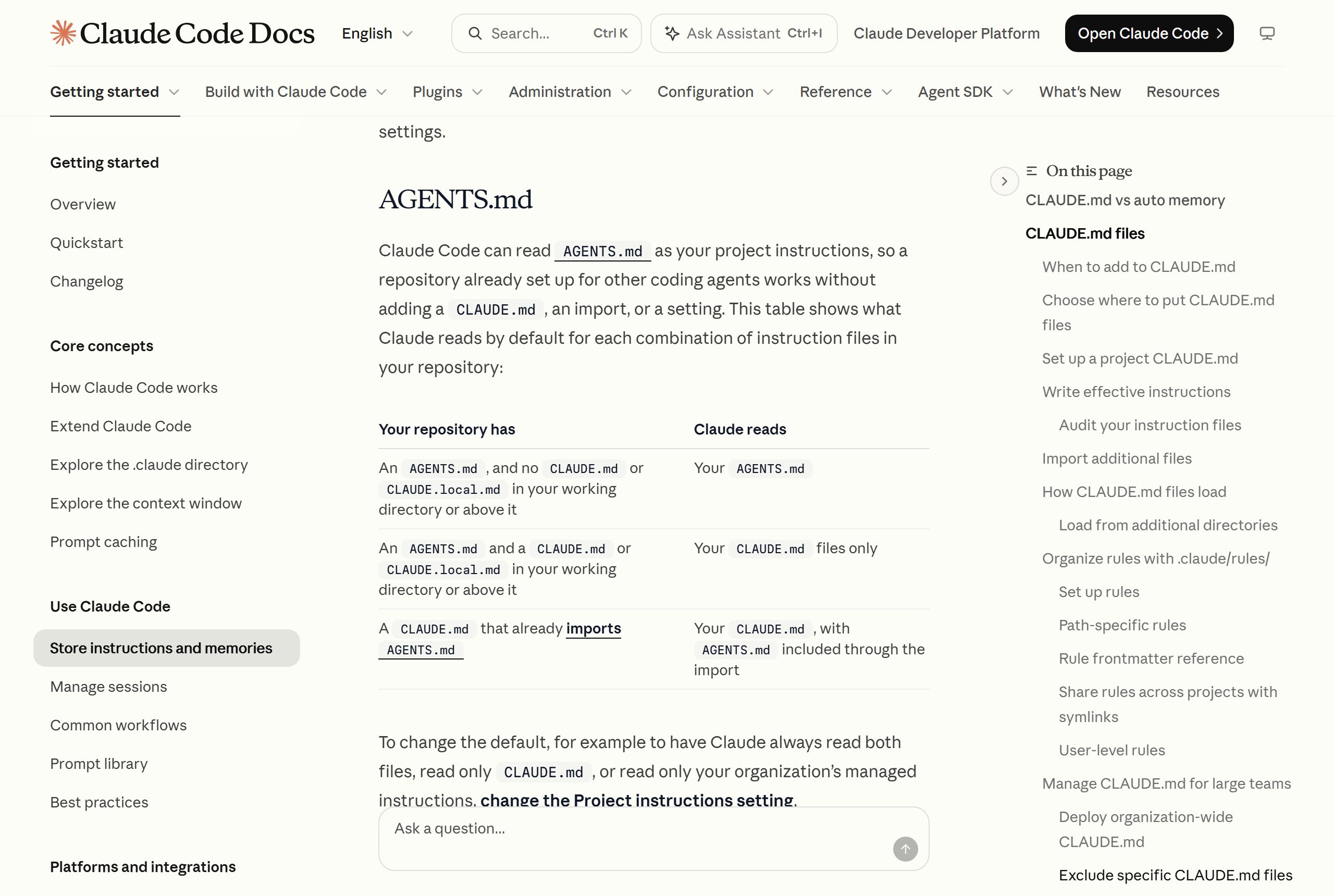
- Only AGENTS.md in the project: Claude Code reads it.
- Both files: by default Claude reads your CLAUDE.md files only.
- To keep one shared file: put
@AGENTS.mdat the top of CLAUDE.md, then add Claude-specific notes below it. Claude reads the imported file first.
@AGENTS.md

## Claude Code
Use plan mode for changes under `src/billing/`.
If you use both Claude Code and Codex on a project, this import keeps both agents on the same rules. More on the two tools in Claude Code vs Codex.
Keep it working
- Review it monthly. Remove outdated or contradictory lines. Two conflicting instructions make Claude pick one arbitrarily.
- Add a line when Claude repeats a mistake. If you correct the same thing twice, it belongs in the file.
- Check it loaded. Run
/contextand look for your file under Memory files.
Learn to build with Claude Code
The Stride AI Coding course teaches Claude Code and Codex for building client tools, written for non-programmers, with weekly live calls. The free guide library has more Claude Code setups.
FAQ
What is an example of a good CLAUDE.md file?
A good one is short and specific: a sentence on what the project is, exact commands to install, run and test it, conventions that differ from defaults, and a short "never" list. The client web app example above is a typical shape. Keep it under about 200 lines.
Where does the CLAUDE.md file go?
Put the project file at the root of your repository as CLAUDE.md or .claude/CLAUDE.md and commit it. Personal instructions for every project go in ~/.claude/CLAUDE.md. Personal notes for one project go in CLAUDE.local.md, added to .gitignore.
Should I use AGENTS.md or CLAUDE.md?
If you only use Claude Code, CLAUDE.md is enough. If other agents work on the repo too, keep the shared rules in AGENTS.md and either let Claude Code read it directly or import it with @AGENTS.md at the top of your CLAUDE.md.
Does Claude always follow CLAUDE.md?
It treats it as strong context, not a hard rule, and follows short, specific instructions most reliably. For anything that must never happen, such as editing a secrets file, add a PreToolUse hook that blocks the action.
