Install Claude Code on Mac, Windows and Linux
Install Claude Code on Mac, Windows or Linux with one command. Exact steps for each system, how to sign in, and fixes for common install errors.
Josh Pocock6 min read

AI Coding
Install Claude Code
Stride AI Academy
To install Claude Code, open a terminal, paste one command for your system and run it. Then open a new terminal window, run claude --version to confirm it worked, and run claude to sign in. You need a paid Claude plan or a Console account, because the free claude.ai plan doesn't include Claude Code.
Every command below was checked against Anthropic's setup docs on November 7, 2026. The installer changes from time to time, so check the docs if your screen looks different.
Before you install
Check three things first:
- Your system. Claude Code runs on macOS 13.0+, Windows 10 1809+ or Windows Server 2019+, Ubuntu 20.04+, Debian 10+ and Alpine Linux 3.19+. You need at least 4 GB of RAM and an x64 or ARM64 processor.
- Your account. Claude Code needs a Pro, Max, Ultra, Team, Enterprise or Console account. See how much Claude Code costs if you haven't picked a plan.
- Your location. It only works in countries Anthropic supports, and it needs an internet connection.
You don't need Node.js for the recommended install. Older guides may say you do, but only the npm route needs it. Git is optional, though you'll want it for real projects.
How to install Claude Code on Mac and Linux
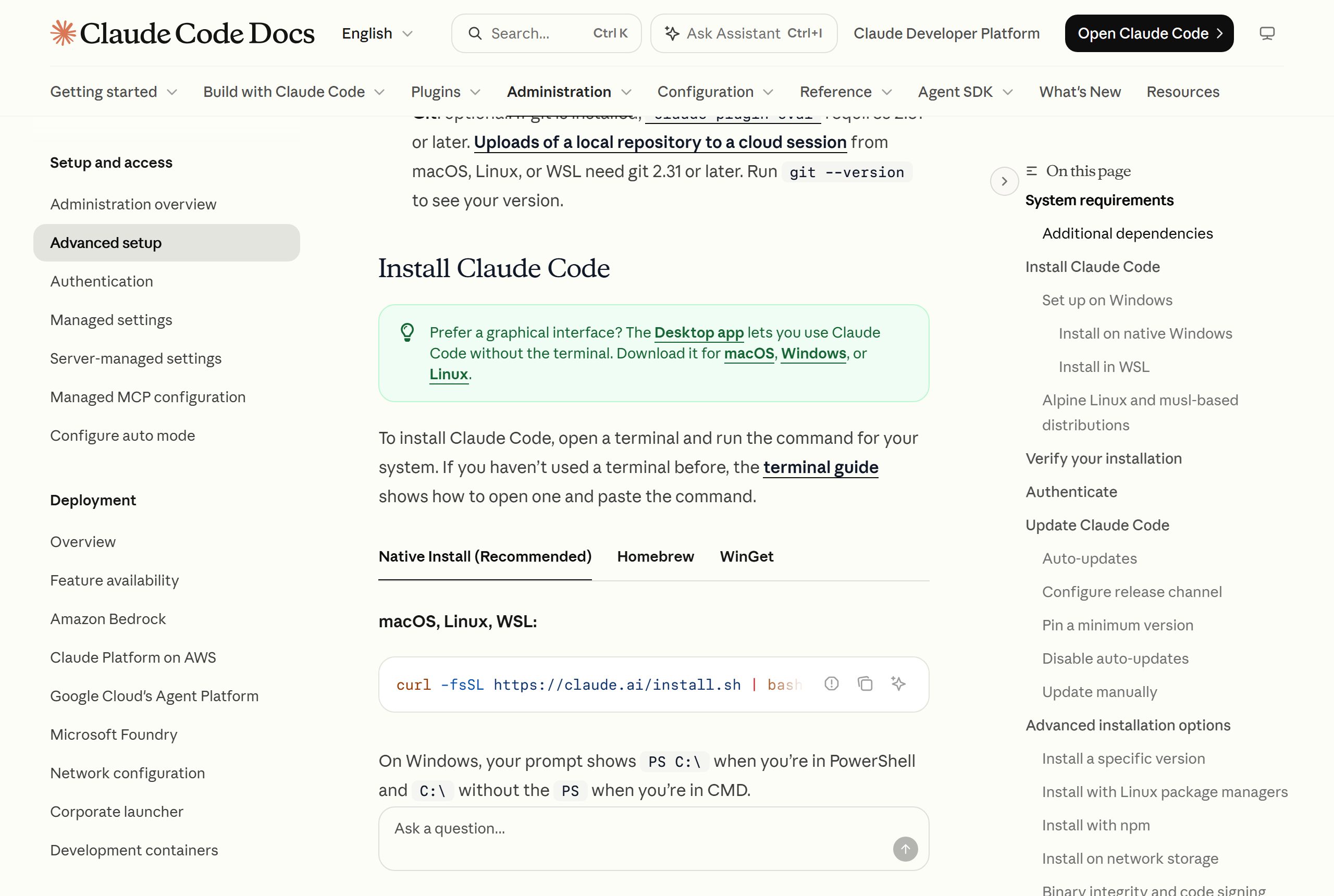
Open Terminal and run:
curl -fsSL https://claude.ai/install.sh | bashThe same command works inside WSL on Windows. It shows no progress while it downloads, so give it a minute before assuming it's stuck.
Prefer Homebrew on a Mac? Run this instead:
brew install --cask claude-codeThat cask follows the stable channel, which usually sits about a week behind. Use claude-code@latest if you want new versions as soon as they ship.
How to install Claude Code on Windows
First work out which terminal you're in. Your prompt shows PS C:\ in PowerShell and C:\ without the PS in CMD. Each one needs its own command.
In PowerShell, run:
irm https://claude.ai/install.ps1 | iexIn CMD, run:
curl -fsSL https://claude.ai/install.cmd -o install.cmd && install.cmd && del install.cmdOr use WinGet from either one:
winget install Anthropic.ClaudeCodeYou don't need to run any of these as Administrator, and you don't need WSL. Installing Git for Windows is optional but useful: with it, Claude Code uses Git Bash, and without it, Claude Code runs commands through PowerShell.
Pick WSL 2 if your projects use Linux tools or you want sandboxed commands, because native Windows doesn't support sandboxing. Run the Mac and Linux command inside your WSL terminal, and start claude there too.
Which install method should you use?
Use the native installer unless you have a reason not to. It's the one Anthropic recommends, and it's the simplest way to stay up to date.
| Method | Works on | Updates |
|---|---|---|
| Native installer | Mac, Linux, WSL, Windows | Automatic, in the background |
| Homebrew | Mac | Manual: brew upgrade claude-code |
| WinGet | Windows | Manual: winget upgrade Anthropic.ClaudeCode |
| npm | Mac, Linux, Windows | Automatic if npm's global folder is writable |
| apt, dnf, apk | Linux | Through your normal system upgrades |
If you do use npm, you need Node.js 22 or later. Run npm install -g @anthropic-ai/claude-code, and never add sudo. An install that needs sudo can't update itself.
Don't want a terminal at all? The Claude desktop app includes Claude Code, so there's nothing separate to install. Our guide to Claude Code for non-developers covers that route.
Check that it worked and sign in
From install to first session
- 1Run the install command
- 2Open a new terminal window
- 3Run claude --versionIt should print a version number
- 4Run claude in your project folder
- 5Sign in through the browser
Open a new terminal window first. A window that was already open won't see the new command. Then run:
claude --versionYou should see a version number followed by (Claude Code). For a fuller check of your install and settings, run claude doctor.
Next, move into a project folder and start it:
cd your-project
claude
Follow the browser prompts to log in. Your first session starts in that folder, so open a real project rather than your home directory.
Fix common Claude Code install errors
| What you see | What it means | Fix |
|---|---|---|
command not found: claude or 'claude' is not recognized |
The install folder isn't on your PATH yet | Open a new terminal. If it still fails, add ~/.local/bin on Mac and Linux or %USERPROFILE%\.local\bin on Windows to your PATH |
The token '&&' is not a valid statement separator |
You ran the CMD command in PowerShell | Use irm https://claude.ai/install.ps1 | iex |
'irm' is not recognized |
You ran the PowerShell command in CMD | Use the CMD command above |
'bash' is not recognized or a parameter error about fsSL |
You ran the Mac and Linux command on Windows | Use a Windows command above |
syntax error near unexpected token '<' |
The install script came back as a web page | Check your network or proxy, then see the install troubleshooting docs |
403 during download |
A proxy or filter is blocking downloads.claude.ai, or your region isn't supported |
Try another network, or set HTTPS_PROXY if you're behind a company proxy |
EACCES: permission denied |
Your user can't write to the install folder | Fix ownership of ~/.local, and don't reinstall with sudo |
| An old version keeps running | You have two installs | Keep the native one and remove the extra, such as npm uninstall -g @anthropic-ai/claude-code |
On Mac and Linux, which -a claude lists every copy on your PATH, which makes the two-installs problem easy to spot.
How to update or uninstall Claude Code
Native installs update themselves in the background. To update right now, run:
claude updateRemoving it depends on how you installed it. For a native install on Mac or Linux, run:
rm -f ~/.local/bin/claude
rm -rf ~/.local/share/claude
Use brew uninstall --cask claude-code, winget uninstall Anthropic.ClaudeCode or npm uninstall -g @anthropic-ai/claude-code for those installs. Your settings stay in ~/.claude until you delete that folder yourself, so only remove it if you're sure you don't want them.
Installing Claude Code for a team or client
If you're setting this up on several machines, keep everyone on the same footing. Add this to settings.json to follow the stable channel, which skips releases with major regressions:
{
  "autoUpdatesChannel": "stable"
}
A company can enforce that across its staff through managed settings. Clients on Amazon Bedrock, Google Cloud or Microsoft Foundry can also use those accounts rather than a Claude subscription.
What to do after you install
Start with a small task on a project you can check. Claude Code runs on Opus by default, and our guide to Claude Sonnet vs Opus explains when to switch. Then set up these three things:
- Add a CLAUDE.md file so Claude knows your project's rules.
- Use plan mode to review changes before any code gets edited.
- Connect GitHub and the best MCP servers for your work.
Want to turn this into paid client work? The Claude Code for agencies course covers it, and the Claude Code community is where members share what's working.
FAQ
How do I install Claude Code?
Open a terminal and run curl -fsSL https://claude.ai/install.sh | bash on Mac or Linux, or irm https://claude.ai/install.ps1 | iex in Windows PowerShell. Open a new window, run claude --version to confirm it worked, then run claude to sign in.
Is Claude Code free to install?
The download costs nothing, but you can't use it on the free claude.ai plan. You need a Pro, Max, Ultra, Team, Enterprise or Console account, or a third-party provider such as Amazon Bedrock.
Do I need Node.js to install Claude Code?
No. The native installer, Homebrew and WinGet don't need it. Only the npm route does, and that requires Node.js 22 or later.
Can I install Claude Code on Windows without WSL?
Yes. It runs natively on Windows 10 1809 or later from PowerShell or CMD, and you don't need Administrator rights. Choose WSL 2 only if you want Linux tools or sandboxed commands.
Why does it say claude is not recognized after I install it?
Your terminal doesn't see the install folder yet. Open a new terminal window first, because windows that were already open keep their old PATH. If it still fails, add the install folder to your PATH.
How do I update Claude Code?
Native installs update automatically, and claude update applies an update right away. Homebrew and WinGet installs need brew upgrade claude-code or winget upgrade Anthropic.ClaudeCode.

